
Aligning your Onflo (formerly Let's Talk!) topics with Departments that mirror your district's structure is important for user and topic management.
To manage these settings, System Administrators can navigate to the Departments page within Settings. From these settings you can define departments, as well as Global and Departments owners.
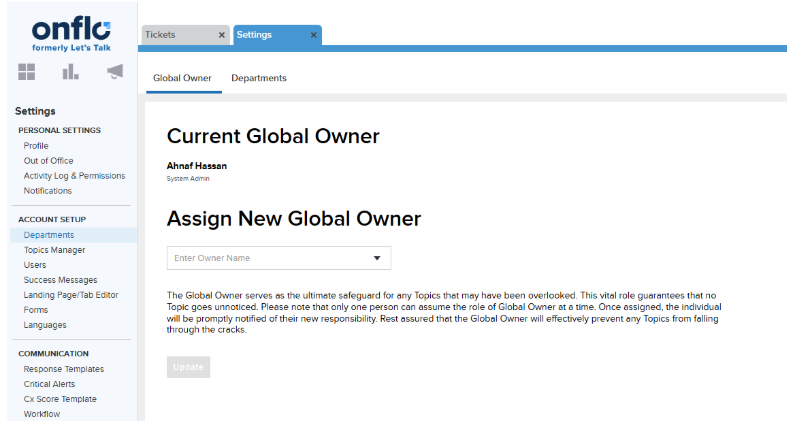
What is the Global Owner?
The Global Owner is the "fallback" owner for your entire Onflo (formerly Let's Talk!) account so that no topic is taken offline because the owner is made inactive, including cases where a topic is not yet mapped to a department. On the Global Owner tab, System Administrators can set who the Global Owner should be for the first time or assign a new one.
What are Department Owners?
Department Owners are similar, in that they are the "fallback" owner for topics assigned to their department so that a topic won't go offline simply because its owner's account is inactivated.
Adding Departments
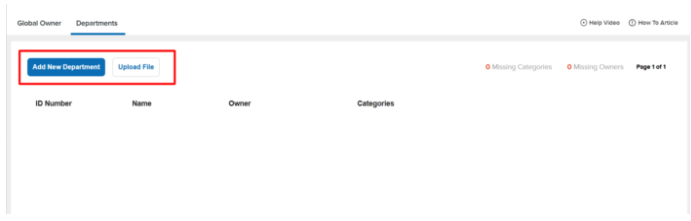
Departments can be added individually or via upload file, and the following information is required:
- Department ID: A unique identifier for each department within the district.
- Department Name: The name of each department.
- Department Owner: The “fallback” owner for topics assigned to their department, so no topic is taken offline simply because the orignal owner is made inactive.
Categories Linked to Department: Map categories to each department. In the event of a topic owner's account inactivation within the linked categories, the new owner defaults to the Department Owner, ensuring continuity and seamless management.
Topic Orphans
Once departments are created, they can be used to easily manage topics without owners, or “orphaned” topics. System Admins and Department Owners can navigate to Topics Manager page within Settings, and then to the Orphans tab.
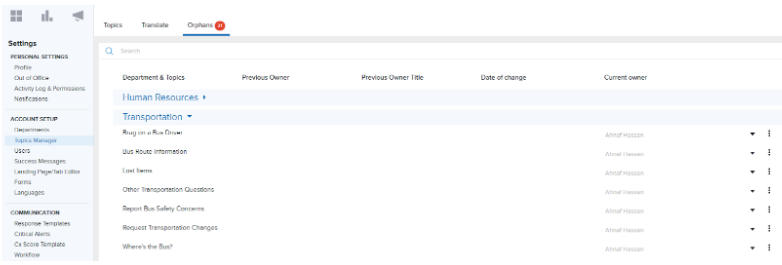
On this page, users will see all the topics without owners for the departments they have access to. System Admins will see all departments, and Department Owners will see the departments they own.
The “Current Owner” by default will be the fallback owner (the department or global owner as mentioned above). Users can update that field to assign a proper owner to each topic, or can decide to archive the topic instead. This is useful in filling in any gaps in topic ownership, especially after users are deactivated from the account.