
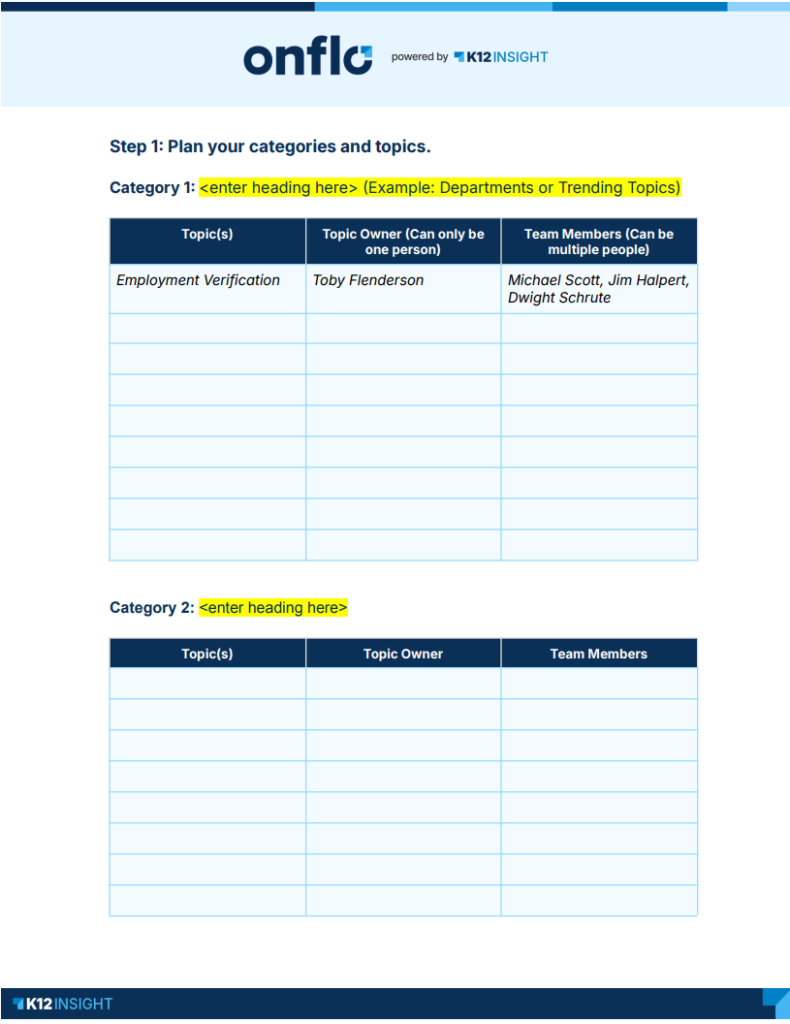
Your team knows your work best. Use this worksheet to map out the categories and topics that reflect how you operate — it only takes a few minutes to complete. Once you're done, share it with your system administrator or category owner so they can add your topics and categories to Onflo.
Key Terms
Category — Bold headings that organize topics into groups on your landing page. Examples: Trending Topics, Departments.
Topic — Buttons customers click to submit a question, comment, suggestion, compliment, or concern. Examples: Superintendent Search, Inclement Weather, Transportation Requests.
Topic Owner — The person responsible for managing submissions for a topic. There can be only one per topic.
Team Member — Anyone who supports the topic owner by responding to or viewing submissions. A topic can have multiple team members.
How to complete your worksheet
- Define your categories. Enter each category name in the Category field.
- Add your topics. List each topic under the category it belongs to. Topics should reflect the most common reasons people reach out to your team.
- Assign a topic owner. Enter one topic owner per topic in the Topic Owner column.
- Add team members (optional). List anyone who will support the topic owner in the Team Members column.
- Submit to your system administrator. Once complete, send your worksheet to your system administrator — they'll use it to configure your team's topics.