
Chatbot Profiles

More results...

Generic selectors
Exact matches only
Search in title
Search in content
Post Type Selectors

Chatbot now offers the option to create school and/or department-specific versions which allows for more tailored and relevant responses.

Add a Profile

From the Settings page, click on Chatbot listed under the Channels section. You will see a Default Profile which lists all of the resources available.
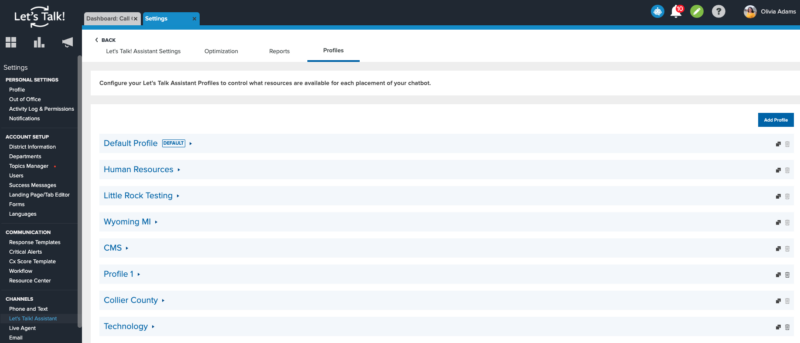
Click "Add Profile" > name your Profile then select the resources and Save.

Add Profile to a Landing Page

Once your Profile is built, you can add it to a Landing Page. Within Settings, select Landing Page/ Tab Editor listed under Account Setup.
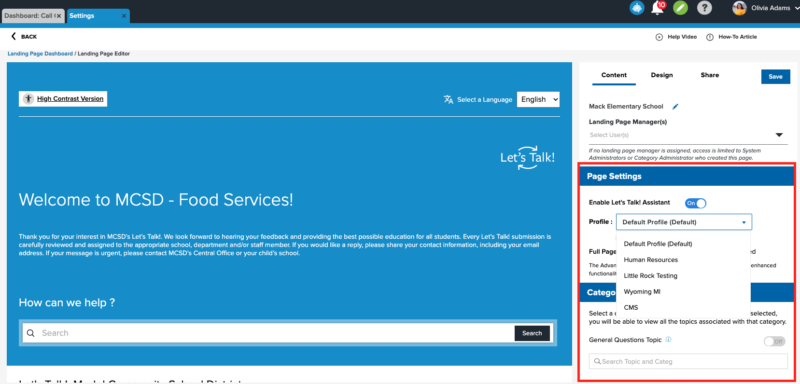
  1. Select your Landing Page.
  2. On the right side of the page under the Content tab, make sure the "Enable Chatbot" option is toggled on.
  3. You will see the Profile drop-down menu where you can select which profile appears on this Landing Page.
  4. Be sure to click the Save button up top.


Related Post

Setting Up a Custom SAML for SSO

Overview Enable Single Sign-On with any SAML 2.0-compliant identity provider. This integration allows your staff and students to securely authenticate to Onflo using existing organizational credentials, reducing password fatigue and improving security posture. Features SAML 2.0 compliant authentication Attribute mapping

Read More ➜

Setting Up a Custom LDAP

Overview Connect to any LDAP-compatible directory service including Microsoft Active Directory, OpenLDAP, or other enterprise directories for user authentication and provisioning. Features LDAP authentication for secure user login Automated directory sync for user provisioning and updates Group membership mapping to

Read More ➜

Setting Up Microsoft Azure for SSO

About this integration Integrate Microsoft Azure Active Directory (Entra ID) to provide secure Single Sign-On and automated directory synchronization. Your district's Microsoft 365 users can access Onflo with their existing credentials while user data remains synchronized automatically. Features Single Sign-On

Read More ➜