
How to Customize Your Onflo Inbox

More results...

Generic selectors
Exact matches only
Search in title
Search in content
Post Type Selectors

Organize your inbox for the way you like to work! You can now customize your inbox to view the fields most relevant to you and group tickets to help you prioritize your inbox.

How to Customize your Inbox

Table Settings

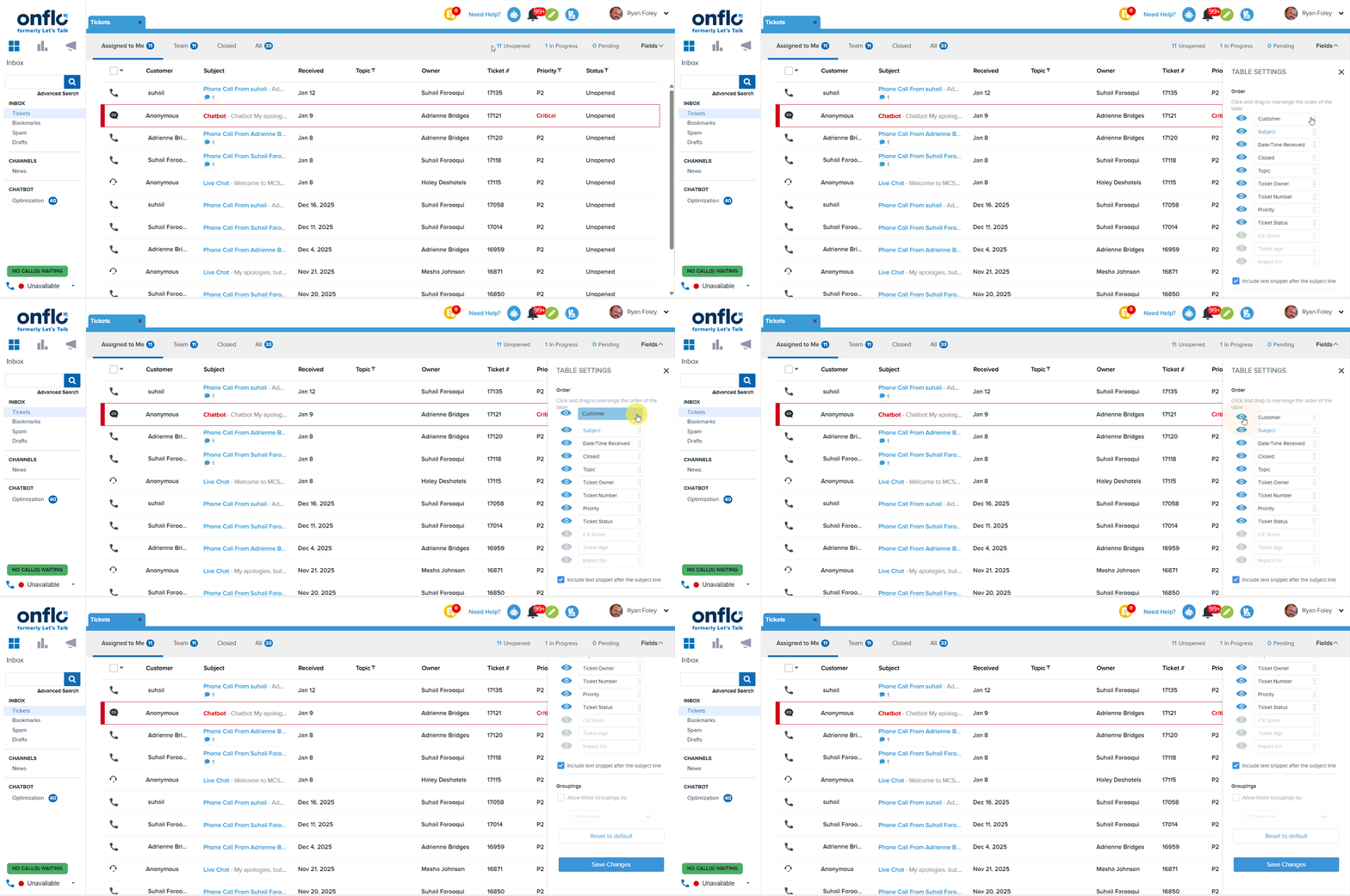
Click on the “Fields” drop-down menu located at the top right of the Inbox to edit Table Settings. By clicking the eye icon,  you can choose which Ticket information you want to display such as Cx Score, Priority, Topic, Ticket Age, etc. Click and drag these elements to arrange the order in which they appear. Save your changes to see your updated Inbox view.
Group Tickets based on Status or Priority

To enable Inbox Groupings, click on the “Fields” drop-down menu located at the top right of the Inbox. Click on the checkbox labeled “Allow Inbox Groupings by:”, then select either the “Status” or “Priority” option. 
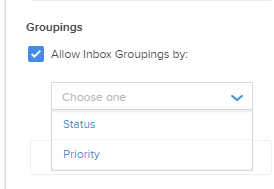
Selecting “Status” will allow you to view Unopened Tickets, In-Progress Tickets, and Tickets with Pending Details in separate groupings.

Selecting “Priority” will allow you to view Tickets in groups based on the Priority level.

Save your changes to see your updated inbox view.

Related Post

Setting Up a Custom SAML for SSO

Overview Enable Single Sign-On with any SAML 2.0-compliant identity provider. This integration allows your staff and students to securely authenticate to Onflo using existing organizational credentials, reducing password fatigue and improving security posture. Features SAML 2.0 compliant authentication Attribute mapping

Read More ➜

Setting Up a Custom LDAP

Overview Connect to any LDAP-compatible directory service including Microsoft Active Directory, OpenLDAP, or other enterprise directories for user authentication and provisioning. Features LDAP authentication for secure user login Automated directory sync for user provisioning and updates Group membership mapping to

Read More ➜

Setting Up Microsoft Azure for SSO

About this integration Integrate Microsoft Azure Active Directory (Entra ID) to provide secure Single Sign-On and automated directory synchronization. Your district's Microsoft 365 users can access Onflo with their existing credentials while user data remains synchronized automatically. Features Single Sign-On

Read More ➜