
Loading...
Skip to content
Onflo formerly Lets talk_white
  • Home
  • Articles
    • How-to Articles
    • Getting Started
    • Best Practices
    • FAQs
  • Product Updates
  • Resources
  • Onflo Academy
    • New User Training
    • System Administrator Training
  • Support
  • Home
  • Articles
    • How-to Articles
    • Getting Started
    • Best Practices
    • FAQs
  • Product Updates
  • Resources
  • Onflo Academy
    • New User Training
    • System Administrator Training
  • Support
Log in

Support Resources & Help

  • Category: Getting Started
  • Tags: Account Setup

More results...

Generic selectors
Exact matches only
Search in title
Search in content
Post Type Selectors

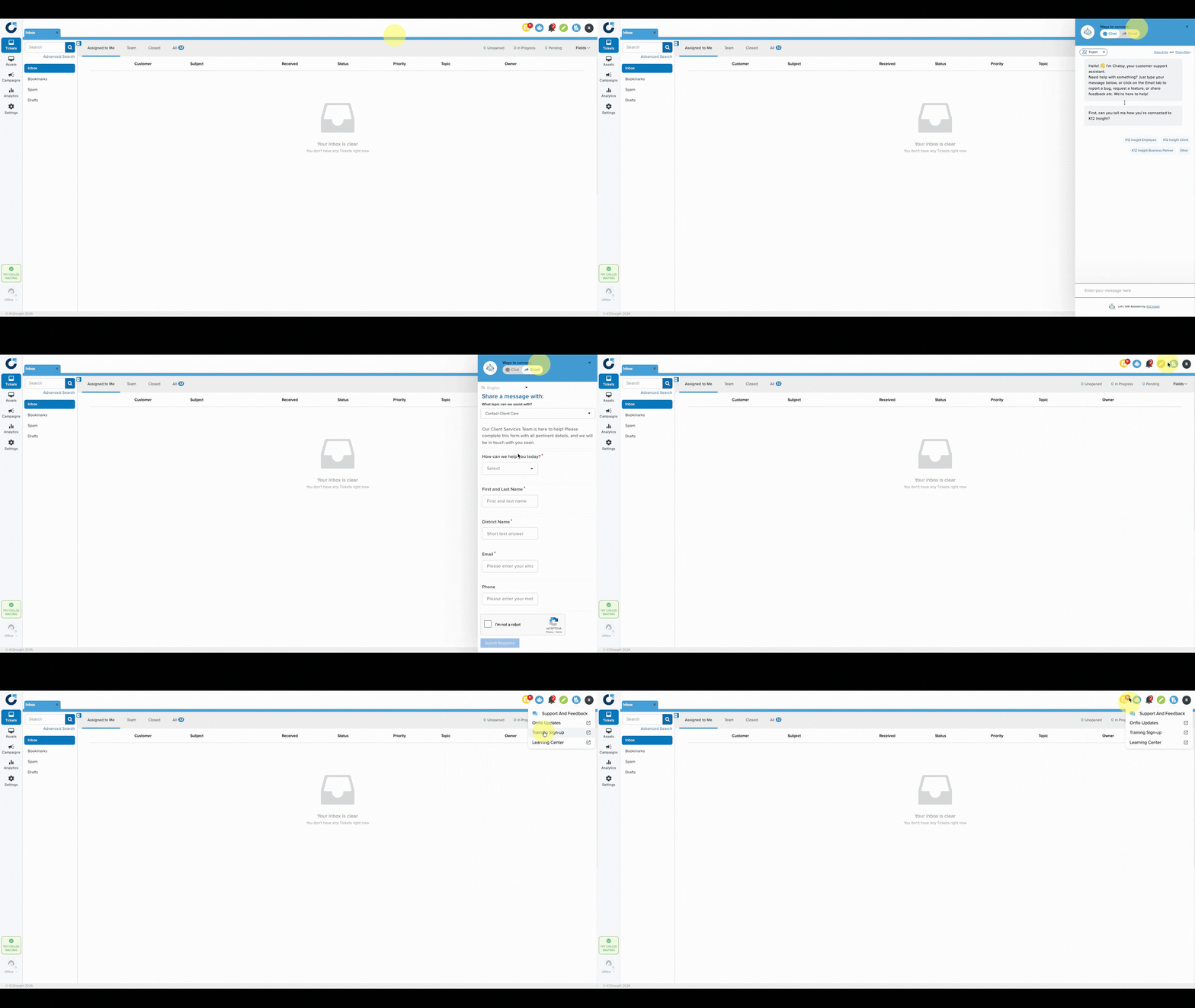
Onflo (formerly Let's Talk) has multiple options available in your dashboard to provide assistance with one click.
Chatbot

The Onflo Chatbot, Chatsy, answers questions by pulling information from our Learning Center to provide you with accurate, step-by-step guidance. For best results and the most accurate information, use complete statements when interacting with our chatbot. Or, if you prefer to interact with our Client Care Team, from inside the chat window click Email and complete the contact form and someone from Client Care will reach out.

Raised Hand Icon

Support And Feedback - Access our Chatbot, or click Email, then complete the contact form to reach out to the Client Care Team.

Onflo Updates - Keep up to date with the latest new releases and updates in Onflo.

Training Sign-Up - See what trainings are currently being offered, or request on demand training for your district.

Learning Center - Our library of self-serve help articles and documents can provide you with quick answers to your questions and guidance on using the wide array of features in our platform.

NextOnflo Digest Preferences

Related Post

How to Allow Microphone Access for Onflo in Google Chrome

If you’re having trouble using your microphone with our application, follow these steps to ensure Chrome is set to allow microphone access: Step 1: Open Chrome Settings Click the three dots menu in the top-right corner of Chrome. Select Settings.

Read More ➜

Onflo Call Center Features: Advanced Routing Settings

Onflo (formerly Let's Talk!) Call Center feature provides many exciting upgrades to our Basic Telephony service. This article will review Call Center’s features including the following:  IVR Routing Business Hours Holiday Calendars Advanced Queue Settings Repeating Queue Greeting In-Queue Voicemails

Read More ➜

Streamlining Access with Single Sign-On for Onflo

Take your Onflo (formerly Let's Talk!) user experience to a new level with single sign-on (SSO). Setting up SSO for Let’s Talk allows users to access the platform using only one set of credentials. Better user experience Grant quick and

Read More ➜
onlo-full-color-splash-page

Need support?

Our Client Services Team is here to help between 7 a.m. – 7 p.m. ET. Get support here or call us at (703) 542-9601.

Mobile App

apple store
g play

Follow Us on

Linkedin Youtube

Quick links

  • Privacy
  • Security
  • Support
  • Training
  • Resources
  • Credits

Articles

  • How-to Articles
  • Product Updates
  • Get Started
  • Best Practices
  • FAQs

Get Newsletter

Sign up to get platform Tips & Tricks delivered directly to your inbox.

Scroll to top